


Every tool to find, fix, and prove
See what AI engines show. Fix what blocks you. Re-scan and prove what changed.
AI citation monitoring with fetch vs render snapshots, evidence capture, and fix packs built for busy operators.
What CiteWorth does
CiteWorth monitors how AI search engines reference your website. It shows what they say and what they miss. When you make changes it re-scans and gives you before/after evidence.
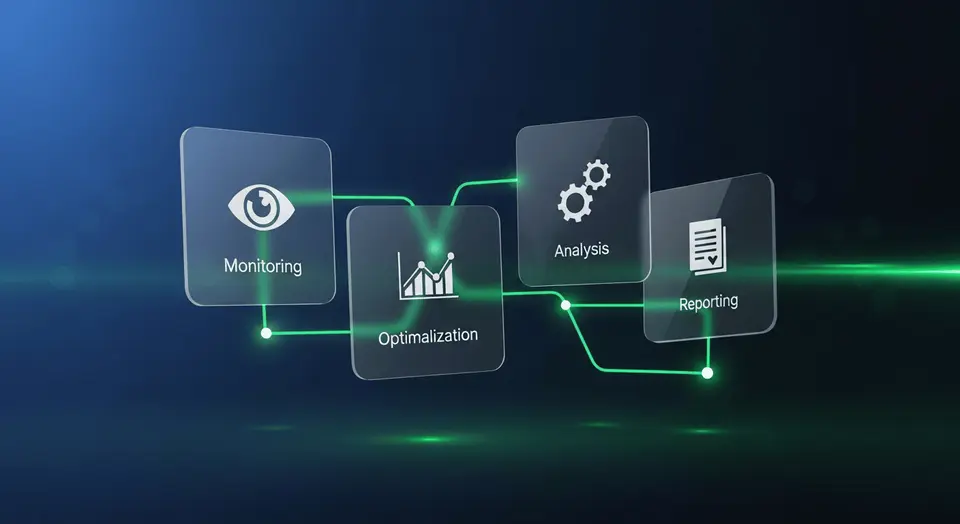
Every tool maps to one of three phases: Find, Fix, or Prove. You always know where you are in the workflow.
Find
See what AI engines say about you. Track citations by query and engine.
Fix
Close gaps with step-by-step Fix Packs and page-level guidance.
Prove
Re-scan after changes. Compare before and after with evidence.
All features
Citations & Mentions
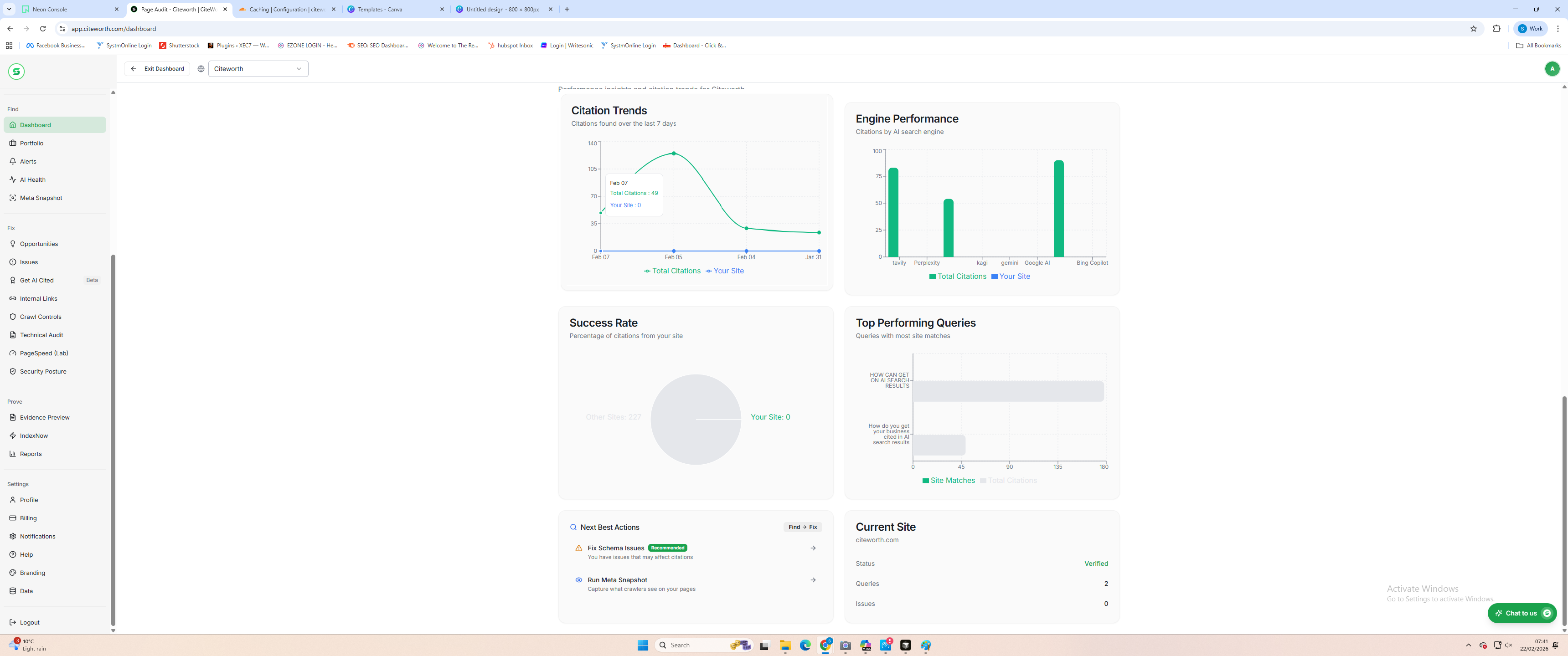
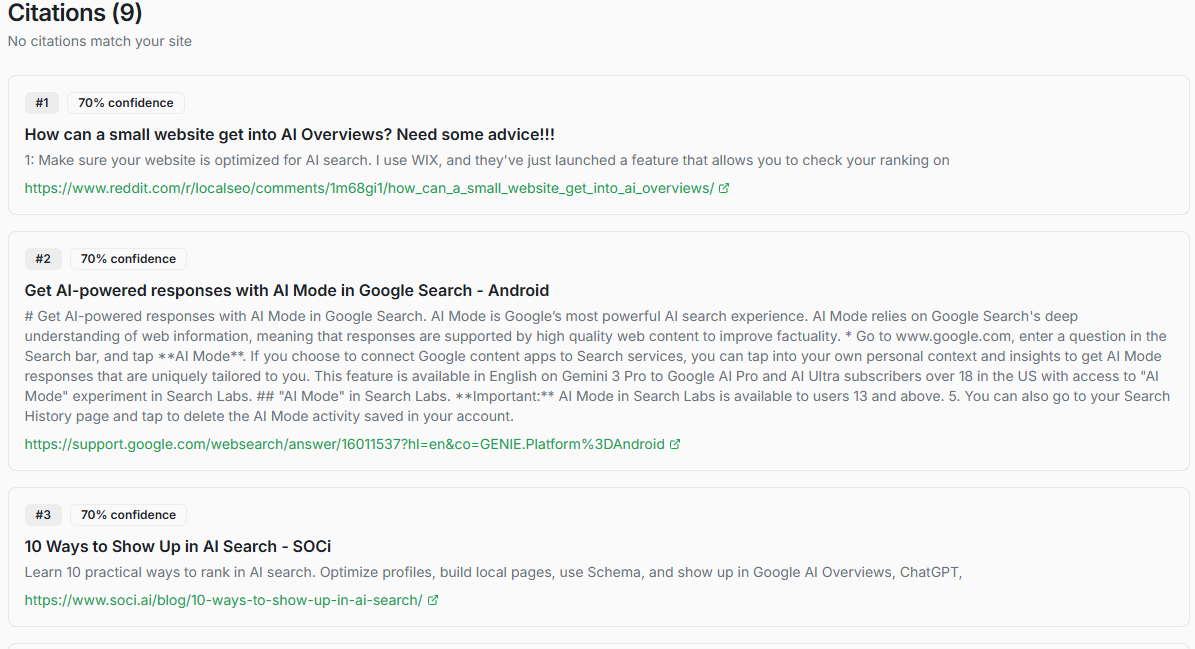
Find Every time an AI engine links to your site, CiteWorth logs it with the query, engine name, and a timestamp.
Citations & Mentions
FindEvery time an AI engine links to your site, CiteWorth logs it with the query, engine name, and a timestamp.
- Evidence-backed findings
- Answer snapshots
- Shareable outputs
Every time an AI engine links to your site, CiteWorth logs it with the query, engine name, and a timestamp. Paid plans attach a screenshot so you have hard evidence. Over time you build a citation history that shows whether mentions are rising or falling. Use it to prove visibility trends to clients and spot regressions early before they compound.
- Citations and mentions by query
- Engine-by-engine breakdown
- Answer capture (plan-dependent)
- History over time
AI Answers
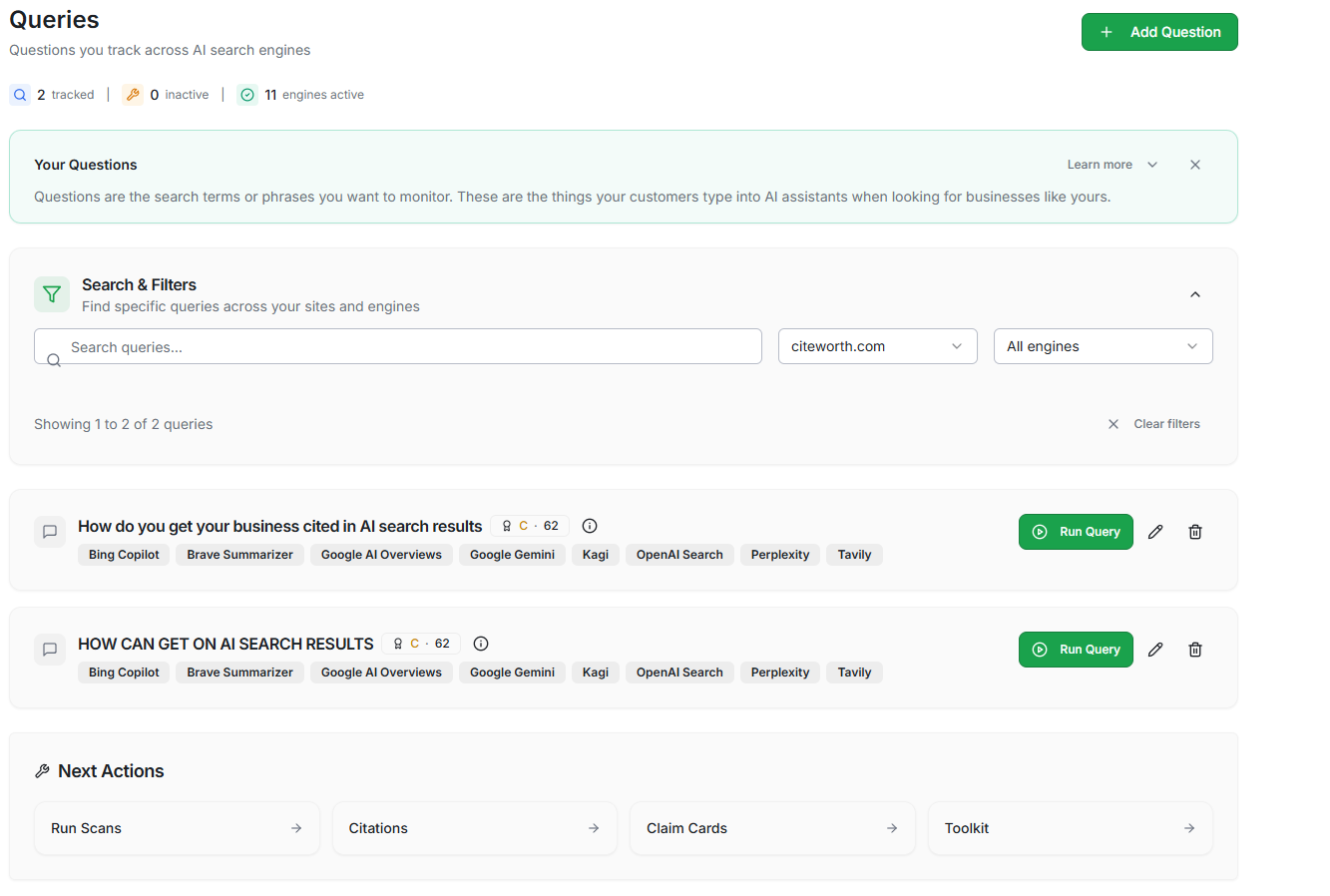
Find Submit questions to multiple AI engines and record exactly what they return.
AI Answers
FindSubmit questions to multiple AI engines and record exactly what they return.
- Query tracking
- Answer snapshots
- Citations/coverage
Submit questions to multiple AI engines and record exactly what they return. Each scan captures response text and cited sources with a timestamp. Run the same queries after deploying changes and compare side-by-side to prove AI answers updated. Paid plans add evidence screenshots you can share with clients or stakeholders.
- Full answer capture per query
- Source attribution tracking
- Side-by-side engine comparison
- Historical answer snapshots
AI Visibility Score
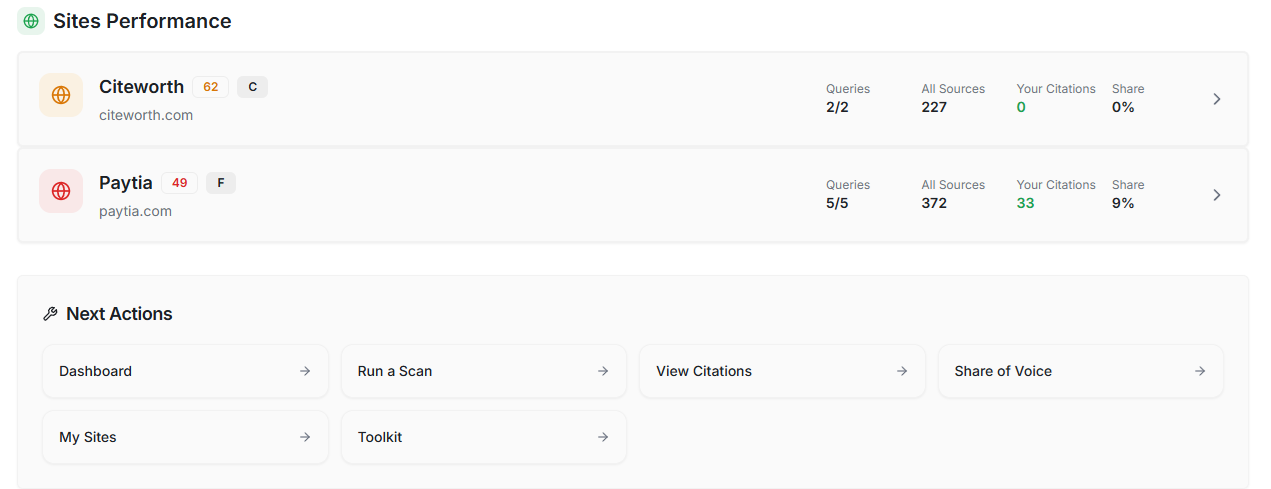
Find One composite score shows how visible your site is across every AI engine you monitor.
AI Visibility Score
FindOne composite score shows how visible your site is across every AI engine you monitor.
- Fast health read
- Trend-friendly
- Built for operators
One composite score shows how visible your site is across every AI engine you monitor. CiteWorth breaks it down by engine and query so you see exactly where you are strong and where gaps remain. Track the score over time and benchmark against competitors. Use the trend line in reports to prove that optimisation work is moving the needle.
- Composite visibility scoring
- Breakdown by engine and query
- Trend tracking over time
- Benchmark against competitors
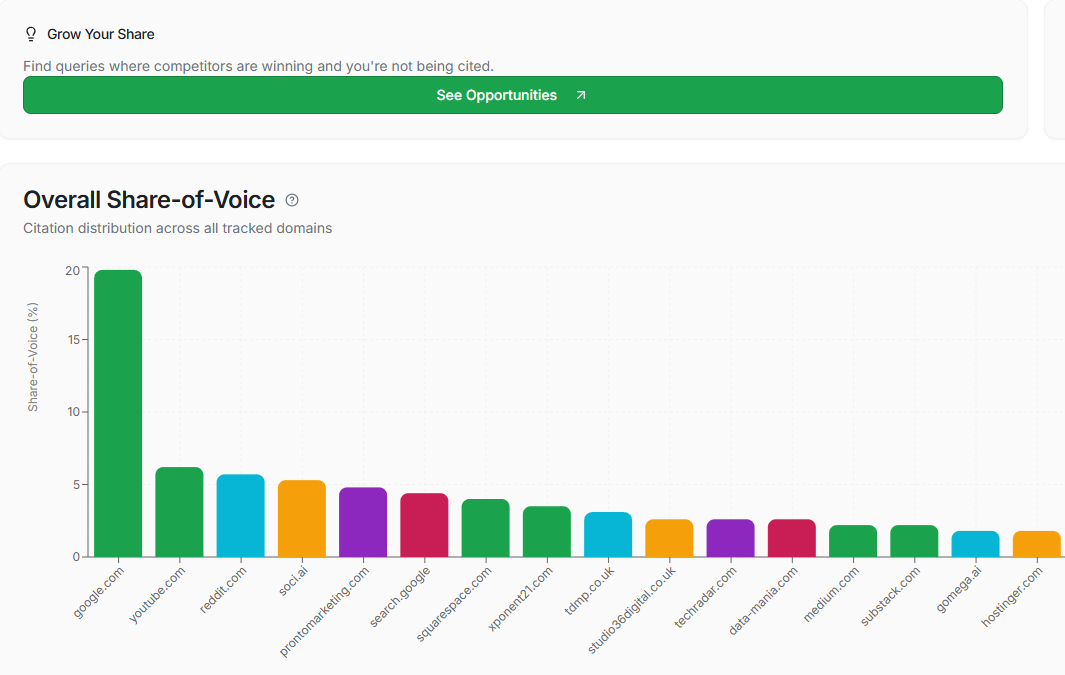
Competitors & Share of Voice
Find Add competitor domains and compare who gets cited for your target queries.
Competitors & Share of Voice
FindAdd competitor domains and compare who gets cited for your target queries.
- Coverage vs competitors
- Term-level visibility
- Trend over time
Add competitor domains and compare who gets cited for your target queries. CiteWorth calculates share of voice by engine so you see exactly where rivals outperform you. Pro plans support up to five competitors and Agency has no limit. Results refresh with every scan, giving you a live leaderboard you can include in client reports.
- Citation share by query
- Citation share by engine
- Trend comparisons
- Competitor set management
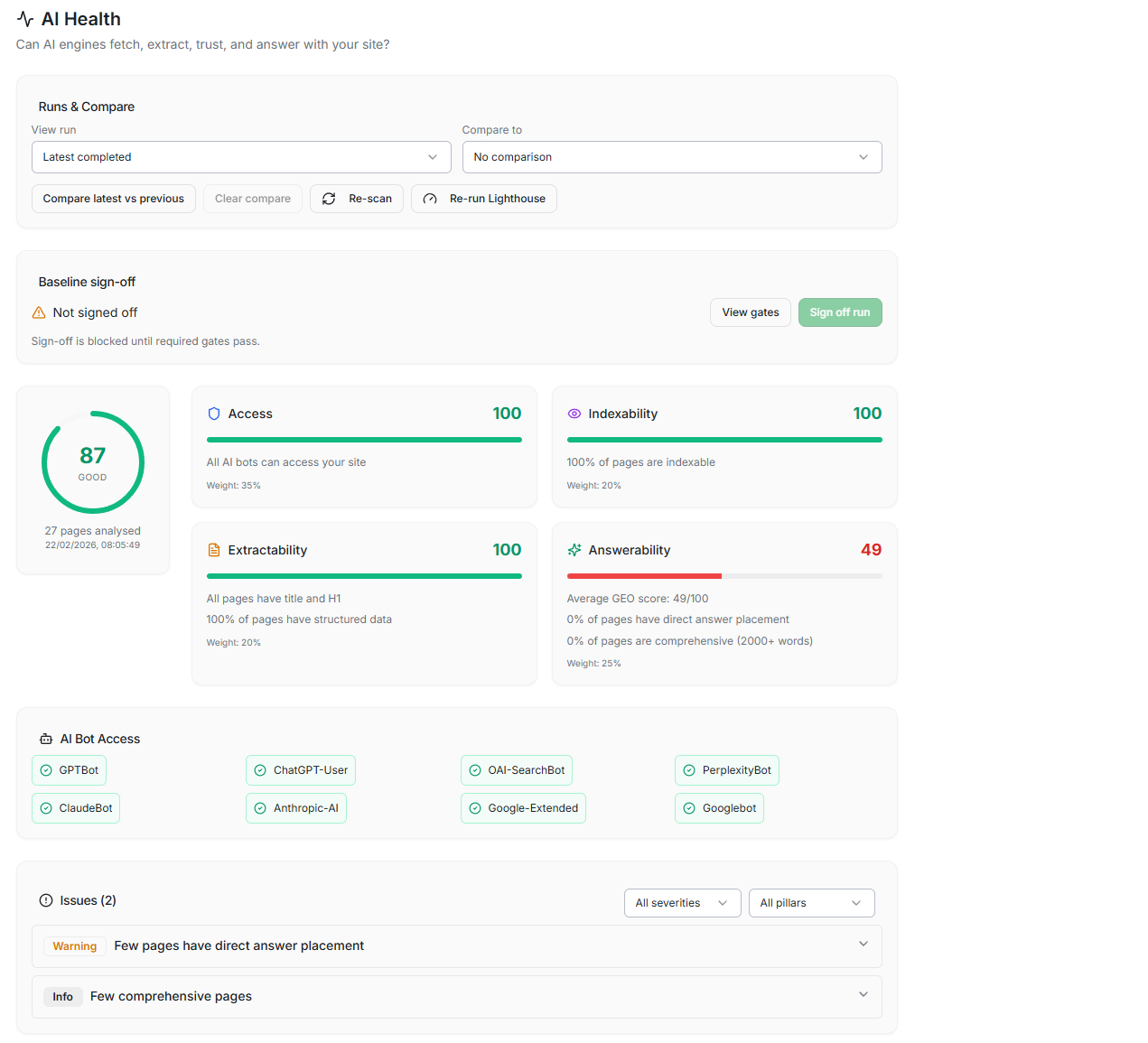
AI Health Score
Find AI Health grades your site from 0 to 100 across four pillars: Access, Indexability, Extractability, and Answerability.
AI Health Score
FindAI Health grades your site from 0 to 100 across four pillars: Access, Indexability, Extractability, and Answerability.
- Score + breakdown
- Top blockers
- Prioritised fixes
AI Health grades your site from 0 to 100 across four pillars: Access, Indexability, Extractability, and Answerability. It uses data from your existing scans so no extra crawl is needed. A single number tells stakeholders how AI-ready the site is. Re-run scans after fixes and watch the score climb to prove improvements are real.
- Single 0-100 readiness score
- Four-pillar breakdown
- Run-to-run comparison
- Uses existing scan data
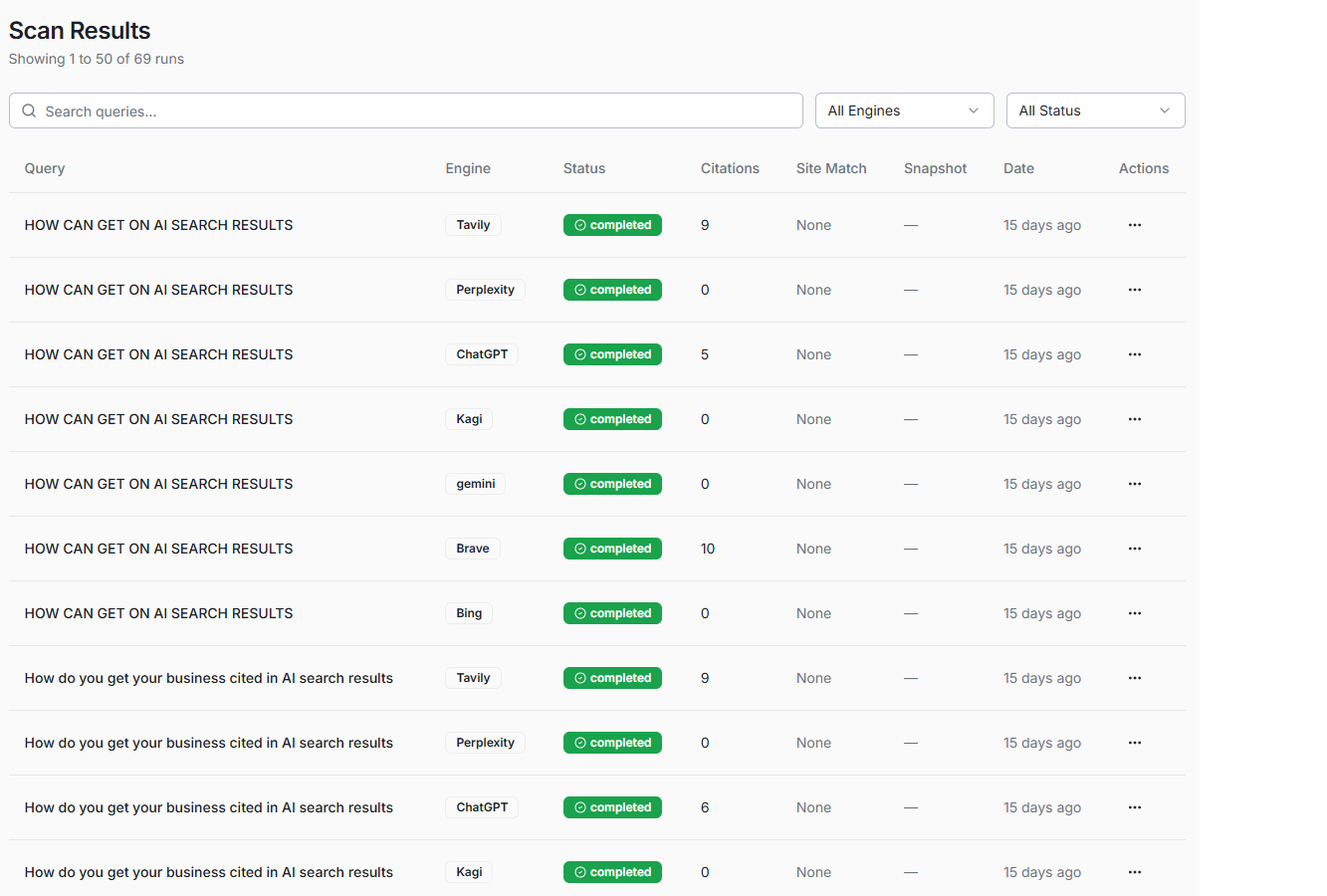
Meta Snapshot
Find Meta Snapshot captures what crawlers actually see on your pages using two modes.
Meta Snapshot
FindMeta Snapshot captures what crawlers actually see on your pages using two modes.
- Fetch vs render
- Structured data checks
- Indexability signals
Meta Snapshot captures what crawlers actually see on your pages using two modes. Fetch mode grabs the raw HTML response. Render mode loads the page in a real browser to catch JavaScript-rendered content. Each snapshot records titles, canonicals, robots directives, and indexing blockers. Compare before and after to prove metadata changes went live.
- Meta, canonical, and robots checks
- Structured data detection
- Redirect and indexing signals
- Fetch vs Render dual-mode capture
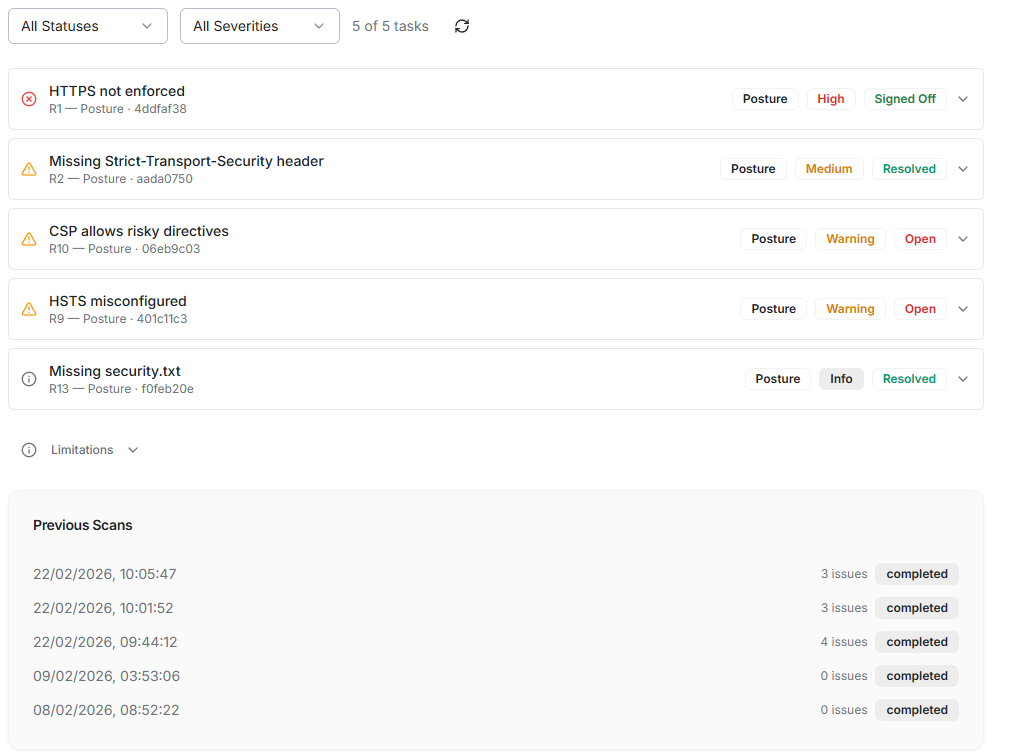
Security Posture
Find Security Posture runs thirteen deterministic checks covering HTTPS, security headers, cookie flags, cache-control, security.txt, and common vulnerabilities.
Security Posture
FindSecurity Posture runs thirteen deterministic checks covering HTTPS, security headers, cookie flags, cache-control, security.txt, and common vulnerabilities.
- Deterministic checks
- Severity signals
- Clear fixes
Security Posture runs thirteen deterministic checks covering HTTPS, security headers, cookie flags, cache-control, security.txt, and common vulnerabilities. Each finding is graded by severity with a fix hint so your developer knows exactly what to change. Mark issues as resolved and re-scan to prove the gap is closed. A clean security baseline builds crawler trust and reduces indexation risk.
- Thirteen deterministic security checks
- Severity-rated findings with fix guidance
- Task tracking with status management
- Re-scan to prove resolution
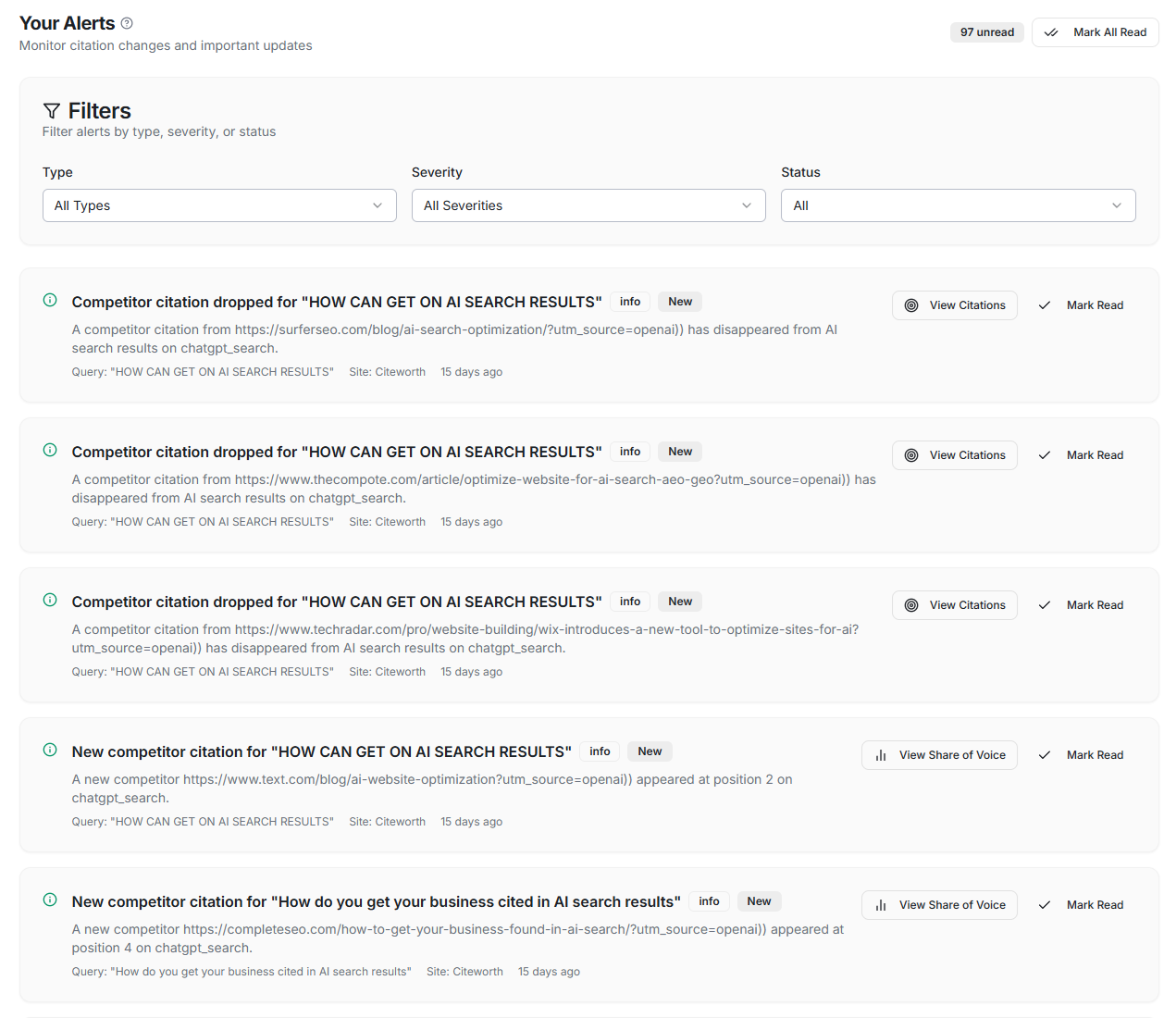
Alerts
Find Alerts notify you when AI visibility changes so you do not need to check manually.
Alerts
FindAlerts notify you when AI visibility changes so you do not need to check manually.
- New issues
- Regression signals
- Evidence links
Alerts notify you when AI visibility changes so you do not need to check manually. A new citation appears, a mention disappears, or a score threshold is crossed and you get an email with a link to the evidence. Configure alert preferences per site to avoid noise. Pair alerts with scheduled scans to catch regressions early.
- Citation change alerts
- Visibility score threshold alerts
- Issue detection notifications
- Email and in-app delivery
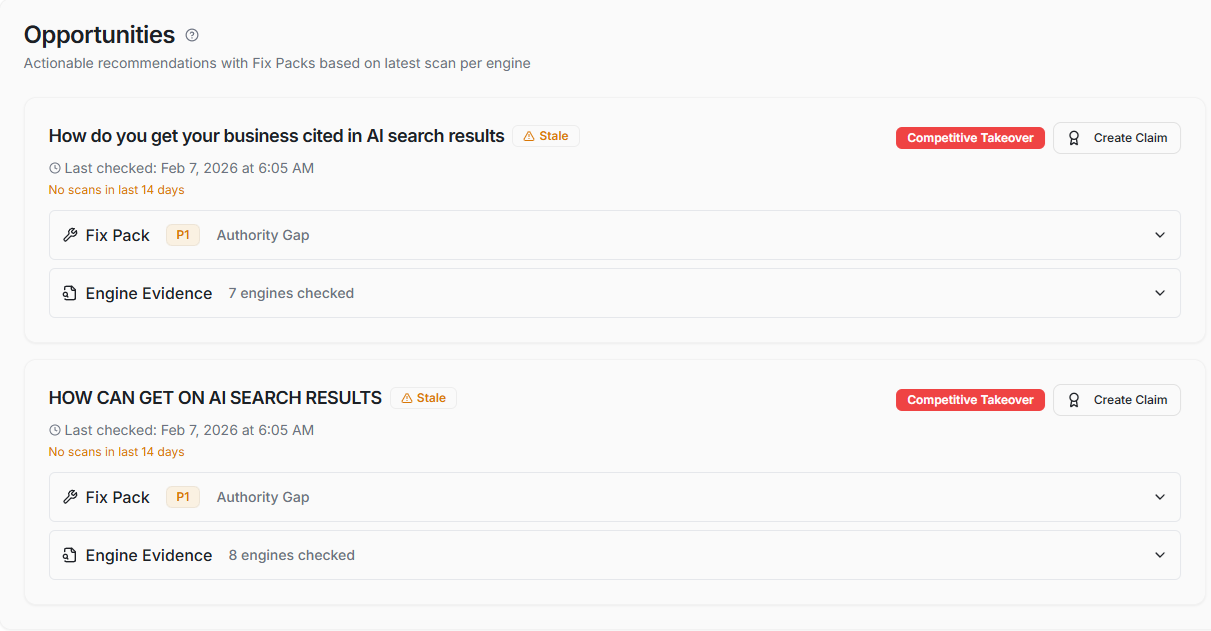
Opportunities
Fix Opportunities ranks improvements by potential impact so you know where to start.
Opportunities
FixOpportunities ranks improvements by potential impact so you know where to start.
- Prioritised wins
- Evidence-led
- Clear next steps
Opportunities ranks improvements by potential impact so you know where to start. CiteWorth analyses scan results and citation gaps to recommend specific fixes. Each opportunity links directly to the affected page with a concrete next step. The list refreshes after every scan. Work through high-impact items first and re-scan to prove the gaps are closed.
- Competitor coverage per query
- Gap summaries
- Action checklist per opportunity
- Prioritisation by impact
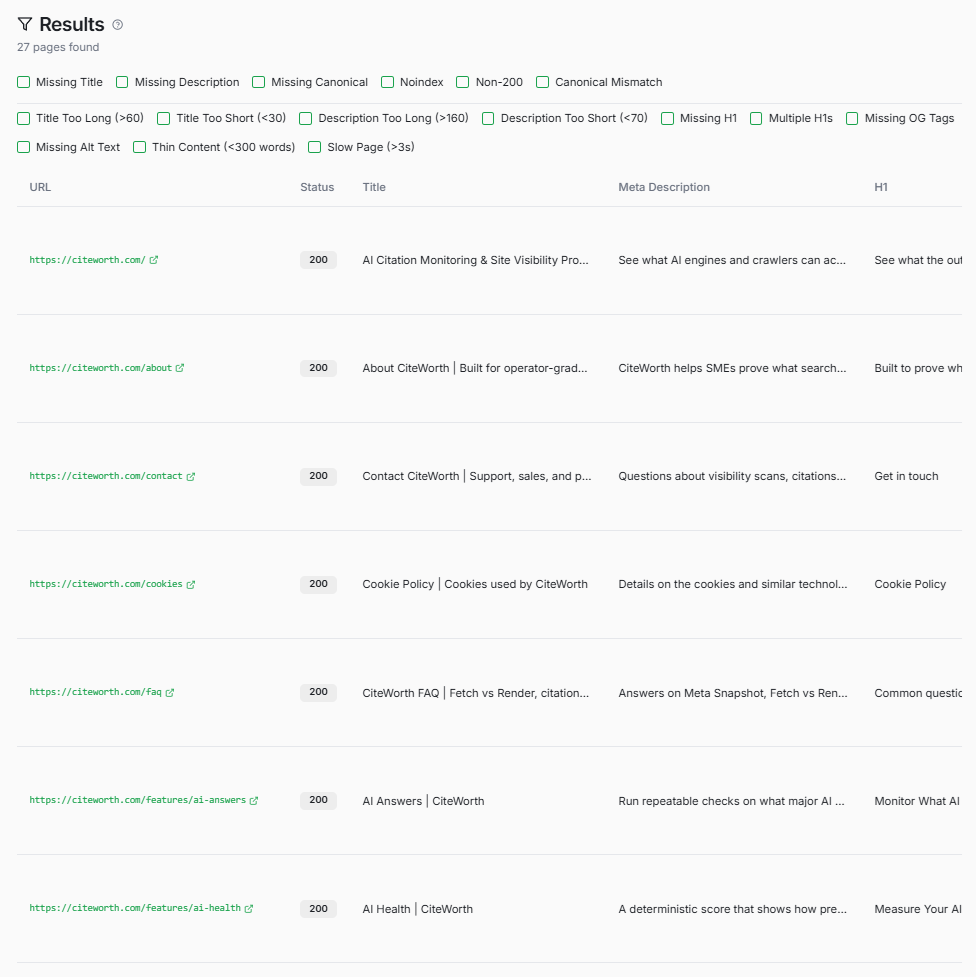
Page Audit
Fix Page Audit checks individual URLs for issues that block indexing and reduce citations.
Page Audit
FixPage Audit checks individual URLs for issues that block indexing and reduce citations.
- Issue breakdown
- Fix guidance
- Re-test ready
Page Audit checks individual URLs for issues that block indexing and reduce citations. It covers missing titles, broken canonicals, noindex tags, and schema gaps. Each issue is graded by severity with a fix recommendation your developer can act on. Re-audit after deploying fixes to prove the issue is resolved and build a before-and-after evidence trail.
- Per-page issue breakdown
- Fix Assist AI guidance (Agency)
- Platform-specific recommendations
- Before/after comparison
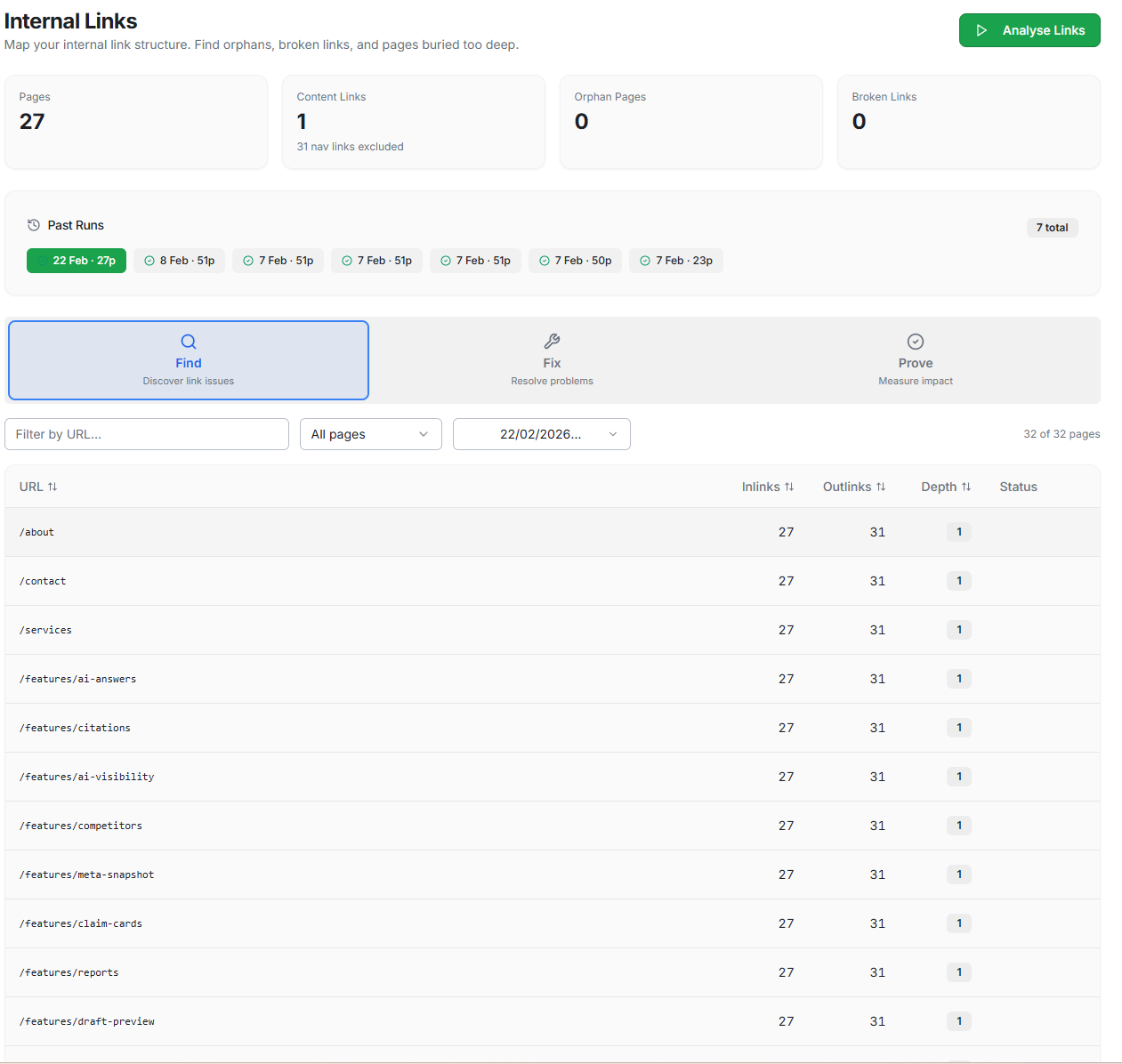
Internal Links
Fix Internal Links maps your link graph from the latest Meta Snapshot crawl to find orphan pages and broken links.
Internal Links
FixInternal Links maps your link graph from the latest Meta Snapshot crawl to find orphan pages and broken links.
- Orphan detection
- Broken links
- Depth analysis
Internal Links maps your link graph from the latest Meta Snapshot crawl to find orphan pages and broken links. Orphan pages with zero inlinks are invisible to crawlers and unlikely to be cited. Deep pages beyond three clicks from the homepage get less attention from AI engines. Fix the structure and re-crawl to prove the graph improved.
- Detect orphan pages with zero inlinks
- Flag broken internal links (4xx/5xx)
- Measure click depth from homepage
- Before-and-after comparison
Claim Cards
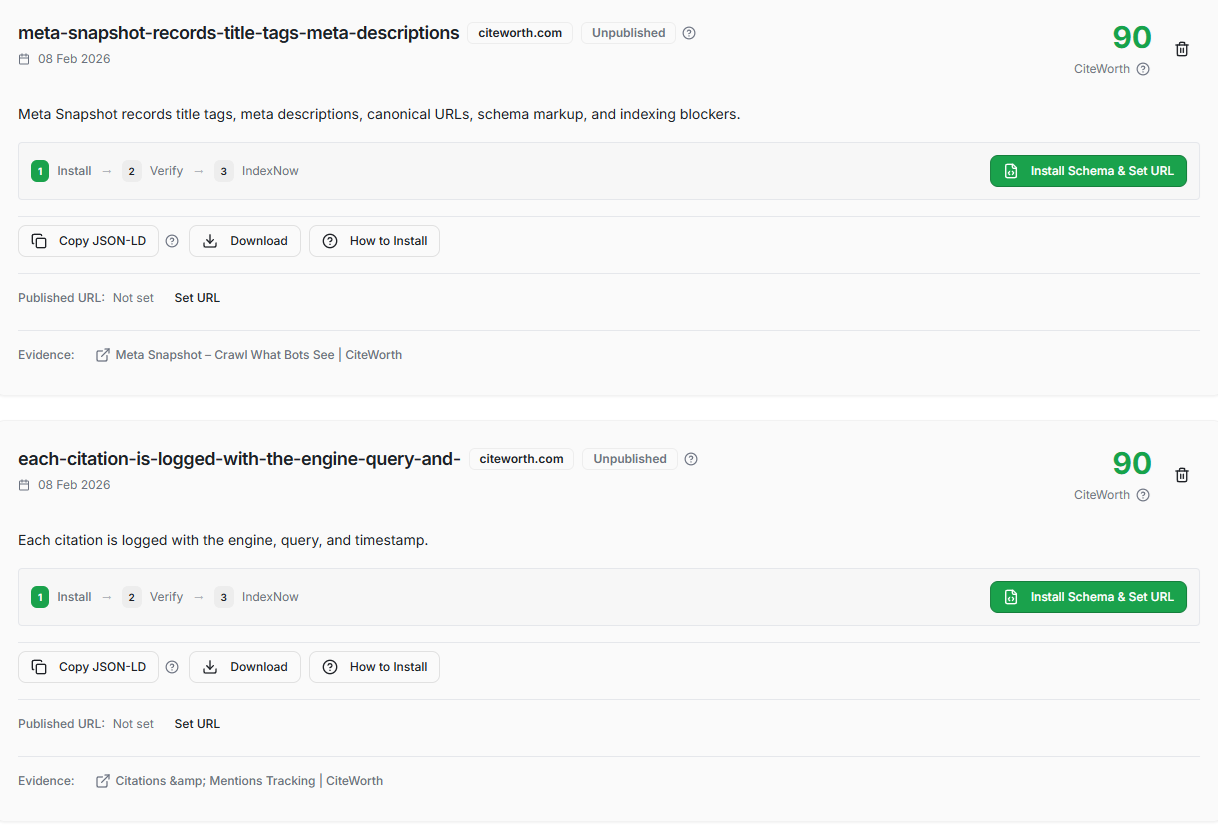
Fix Claim Cards turn findings into structured, shareable assets that AI engines can reference.
Claim Cards
FixClaim Cards turn findings into structured, shareable assets that AI engines can reference.
- Structured claims
- Evidence attached
- Share-ready
Claim Cards turn findings into structured, shareable assets that AI engines can reference. Each card packages a verifiable claim with attached scan evidence. Use them for client reporting, pitch decks, or to embed structured data on your site. Cards can be created manually from scan results or generated via Smart Claims Discovery (Pro/Agency).
- Create a claim
- Publish JSON-LD
- Verify evidence
Smart Claims Discovery
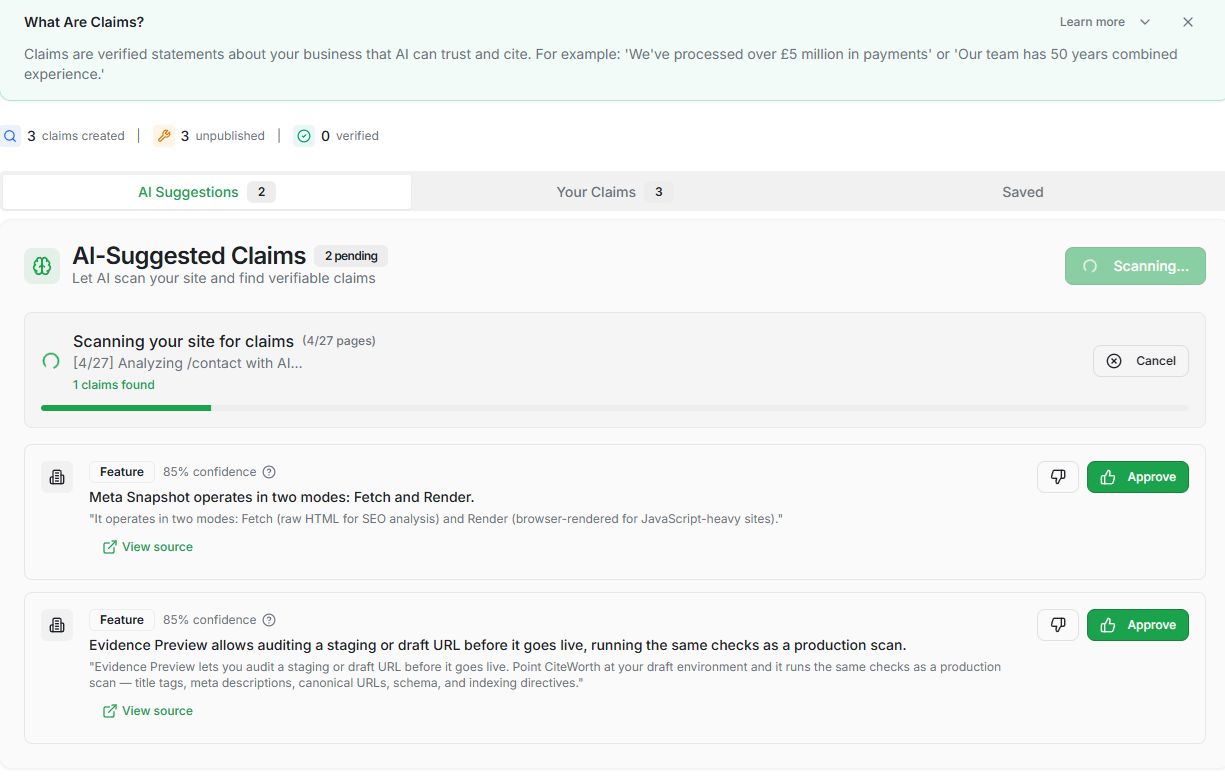
Fix Smart Claims Discovery crawls your sitemap and uses multiple AI engines/models to extract verifiable claims automatically (Pro/Agency).
Smart Claims Discovery
FixSmart Claims Discovery crawls your sitemap and uses multiple AI engines/models to extract verifiable claims automatically (Pro/Agency).
- AI-assisted extraction
- Confidence scoring
- One-click approve
Smart Claims Discovery crawls your sitemap and uses multiple AI engines/models to extract verifiable claims automatically (Pro/Agency). Claims with consensus score higher. Gap Analysis identifies pages AI engines already cite but where you have no structured claims, revealing missed opportunities. Approve suggestions with one click to convert them into trackable Claim Cards.
- Automatic sitemap crawling (Pro/Agency)
- Multi-engine claim extraction (Pro/Agency)
- Confidence scoring with consensus boost
- Gap analysis: cited pages missing claims
Evidence Preview
Prove Evidence Preview audits a staging or draft URL before it goes live.
Evidence Preview
ProveEvidence Preview audits a staging or draft URL before it goes live.
Evidence Preview audits a staging or draft URL before it goes live. CiteWorth runs the same checks as a production scan and compares draft results against your live site. You catch regressions in metadata, indexing signals, and structured data before they ship. This is your pre-deployment safety net so you can prove changes are correct before they reach production.
- Pre-launch URL checks
- Compare key signals: draft vs live
- Catch blockers before deploy
- Repeatable sign-off workflow
IndexNow
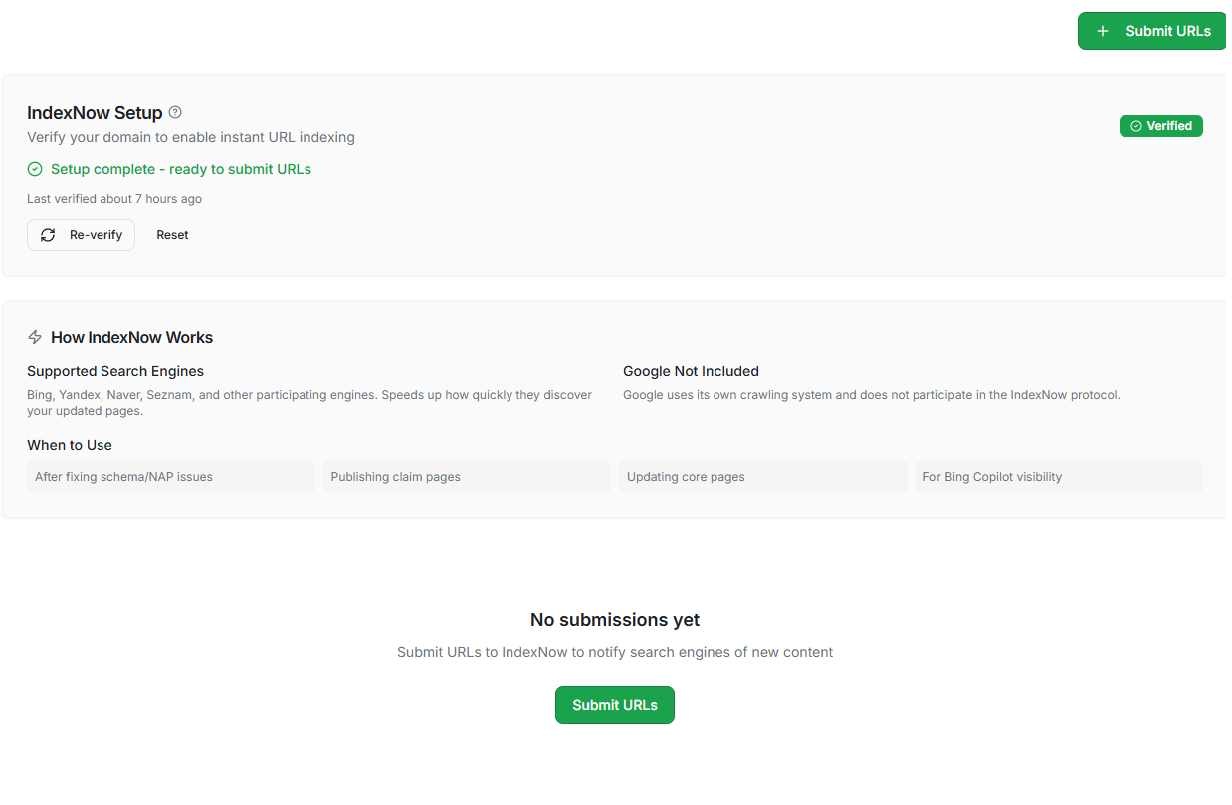
Prove IndexNow pings participating search engines the moment you update a page.
IndexNow
ProveIndexNow pings participating search engines the moment you update a page.
- Instant ping
- Submission log
- Status tracking
IndexNow pings participating search engines the moment you update a page. Instead of waiting for organic crawling, you submit URLs directly and CiteWorth tracks each submission with a timestamp and response status. This closes the loop between deploying a fix and getting re-crawled. Use it after shipping changes to shorten the feedback cycle on your next scan.
- Key management
- URL submission
- Submission history
- Sitemap-based submission (if enabled)
Reports
Prove Reports package scan results, citation data, and before-and-after comparisons into shareable documents.
Reports
ProveReports package scan results, citation data, and before-and-after comparisons into shareable documents.
- Run history
- Result deltas
- Evidence outputs
Reports package scan results, citation data, and before-and-after comparisons into shareable documents. Each report captures AI visibility at a point in time. Include trend lines to show progress over weeks or months. Agency-tier reports are watermark-free with white-label branding. Share via PDF or a secure link your client can bookmark.
- Visibility trend summaries
- Citation and competitor breakdowns
- Before/after comparisons
- PDF and shareable link exports
- Evidence-backed findings
- Answer snapshots
- Shareable outputs
Citations & Mentions
FindEvery time an AI engine links to your site, CiteWorth logs it with the query, engine name, and a timestamp. Paid plans attach a screenshot so you have hard evidence. Over time you build a citation history that shows whether mentions are rising or falling. Use it to prove visibility trends to clients and spot regressions early before they compound.
- Citations and mentions by query
- Engine-by-engine breakdown
- Answer capture (plan-dependent)
- History over time
- Query tracking
- Answer snapshots
- Citations/coverage
AI Answers
FindSubmit questions to multiple AI engines and record exactly what they return. Each scan captures response text and cited sources with a timestamp. Run the same queries after deploying changes and compare side-by-side to prove AI answers updated. Paid plans add evidence screenshots you can share with clients or stakeholders.
- Full answer capture per query
- Source attribution tracking
- Side-by-side engine comparison
- Historical answer snapshots
- Fast health read
- Trend-friendly
- Built for operators
AI Visibility Score
FindOne composite score shows how visible your site is across every AI engine you monitor. CiteWorth breaks it down by engine and query so you see exactly where you are strong and where gaps remain. Track the score over time and benchmark against competitors. Use the trend line in reports to prove that optimisation work is moving the needle.
- Composite visibility scoring
- Breakdown by engine and query
- Trend tracking over time
- Benchmark against competitors
- Coverage vs competitors
- Term-level visibility
- Trend over time
Competitors & Share of Voice
FindAdd competitor domains and compare who gets cited for your target queries. CiteWorth calculates share of voice by engine so you see exactly where rivals outperform you. Pro plans support up to five competitors and Agency has no limit. Results refresh with every scan, giving you a live leaderboard you can include in client reports.
- Citation share by query
- Citation share by engine
- Trend comparisons
- Competitor set management
- Score + breakdown
- Top blockers
- Prioritised fixes
AI Health Score
FindAI Health grades your site from 0 to 100 across four pillars: Access, Indexability, Extractability, and Answerability. It uses data from your existing scans so no extra crawl is needed. A single number tells stakeholders how AI-ready the site is. Re-run scans after fixes and watch the score climb to prove improvements are real.
- Single 0-100 readiness score
- Four-pillar breakdown
- Run-to-run comparison
- Uses existing scan data
- Fetch vs render
- Structured data checks
- Indexability signals
Meta Snapshot
FindMeta Snapshot captures what crawlers actually see on your pages using two modes. Fetch mode grabs the raw HTML response. Render mode loads the page in a real browser to catch JavaScript-rendered content. Each snapshot records titles, canonicals, robots directives, and indexing blockers. Compare before and after to prove metadata changes went live.
- Meta, canonical, and robots checks
- Structured data detection
- Redirect and indexing signals
- Fetch vs Render dual-mode capture
- Deterministic checks
- Severity signals
- Clear fixes
Security Posture
FindSecurity Posture runs thirteen deterministic checks covering HTTPS, security headers, cookie flags, cache-control, security.txt, and common vulnerabilities. Each finding is graded by severity with a fix hint so your developer knows exactly what to change. Mark issues as resolved and re-scan to prove the gap is closed. A clean security baseline builds crawler trust and reduces indexation risk.
- Thirteen deterministic security checks
- Severity-rated findings with fix guidance
- Task tracking with status management
- Re-scan to prove resolution
- New issues
- Regression signals
- Evidence links
Alerts
FindAlerts notify you when AI visibility changes so you do not need to check manually. A new citation appears, a mention disappears, or a score threshold is crossed and you get an email with a link to the evidence. Configure alert preferences per site to avoid noise. Pair alerts with scheduled scans to catch regressions early.
- Citation change alerts
- Visibility score threshold alerts
- Issue detection notifications
- Email and in-app delivery
- Prioritised wins
- Evidence-led
- Clear next steps
Opportunities
FixOpportunities ranks improvements by potential impact so you know where to start. CiteWorth analyses scan results and citation gaps to recommend specific fixes. Each opportunity links directly to the affected page with a concrete next step. The list refreshes after every scan. Work through high-impact items first and re-scan to prove the gaps are closed.
- Competitor coverage per query
- Gap summaries
- Action checklist per opportunity
- Prioritisation by impact
- Issue breakdown
- Fix guidance
- Re-test ready
Page Audit
FixPage Audit checks individual URLs for issues that block indexing and reduce citations. It covers missing titles, broken canonicals, noindex tags, and schema gaps. Each issue is graded by severity with a fix recommendation your developer can act on. Re-audit after deploying fixes to prove the issue is resolved and build a before-and-after evidence trail.
- Per-page issue breakdown
- Fix Assist AI guidance (Agency)
- Platform-specific recommendations
- Before/after comparison
- Orphan detection
- Broken links
- Depth analysis
Internal Links
FixInternal Links maps your link graph from the latest Meta Snapshot crawl to find orphan pages and broken links. Orphan pages with zero inlinks are invisible to crawlers and unlikely to be cited. Deep pages beyond three clicks from the homepage get less attention from AI engines. Fix the structure and re-crawl to prove the graph improved.
- Detect orphan pages with zero inlinks
- Flag broken internal links (4xx/5xx)
- Measure click depth from homepage
- Before-and-after comparison
- Structured claims
- Evidence attached
- Share-ready
Claim Cards
FixClaim Cards turn findings into structured, shareable assets that AI engines can reference. Each card packages a verifiable claim with attached scan evidence. Use them for client reporting, pitch decks, or to embed structured data on your site. Cards can be created manually from scan results or generated via Smart Claims Discovery (Pro/Agency).
- Create a claim
- Publish JSON-LD
- Verify evidence
- AI-assisted extraction
- Confidence scoring
- One-click approve
Smart Claims Discovery
FixSmart Claims Discovery crawls your sitemap and uses multiple AI engines/models to extract verifiable claims automatically (Pro/Agency). Claims with consensus score higher. Gap Analysis identifies pages AI engines already cite but where you have no structured claims, revealing missed opportunities. Approve suggestions with one click to convert them into trackable Claim Cards.
- Automatic sitemap crawling (Pro/Agency)
- Multi-engine claim extraction (Pro/Agency)
- Confidence scoring with consensus boost
- Gap analysis: cited pages missing claims
Evidence Preview
ProveEvidence Preview audits a staging or draft URL before it goes live. CiteWorth runs the same checks as a production scan and compares draft results against your live site. You catch regressions in metadata, indexing signals, and structured data before they ship. This is your pre-deployment safety net so you can prove changes are correct before they reach production.
- Pre-launch URL checks
- Compare key signals: draft vs live
- Catch blockers before deploy
- Repeatable sign-off workflow
- Instant ping
- Submission log
- Status tracking
IndexNow
ProveIndexNow pings participating search engines the moment you update a page. Instead of waiting for organic crawling, you submit URLs directly and CiteWorth tracks each submission with a timestamp and response status. This closes the loop between deploying a fix and getting re-crawled. Use it after shipping changes to shorten the feedback cycle on your next scan.
- Key management
- URL submission
- Submission history
- Sitemap-based submission (if enabled)
- Run history
- Result deltas
- Evidence outputs
Reports
ProveReports package scan results, citation data, and before-and-after comparisons into shareable documents. Each report captures AI visibility at a point in time. Include trend lines to show progress over weeks or months. Agency-tier reports are watermark-free with white-label branding. Share via PDF or a secure link your client can bookmark.
- Visibility trend summaries
- Citation and competitor breakdowns
- Before/after comparisons
- PDF and shareable link exports
Also includes: CSV exports, multi-site management, and crawl controls. Evidence capture and scheduling vary by plan.
Why it matters
AI search engines generate answers instead of links. If your site is not structured for extraction, you lose visibility you cannot recover through traditional SEO alone. CiteWorth gives you a repeatable way to monitor, fix, and prove changes across every major AI engine.
Recommended starting path
Run a visibility scan
Add your site and run your first scan to capture a baseline of how AI engines cite you today.
Review gaps and fix packs
Check Opportunities for prioritised actions. Use Meta Snapshot and Page Audit to catch technical blockers.
Re-scan and prove
After deploying fixes, re-scan to compare before and after. Share evidence with clients or stakeholders.
Start with a baseline scan
Add your site. Run a scan. Fix the gaps. Re-scan to prove what changed.
Your data stays private. No credit card needed for the free plan.
How It Works
Add your site
Enter your domain. Verification is optional.
Choose queries + engines
Add the questions customers ask. Pick the engines to check.
Run scans and review
See citations and gaps across queries and engines.
Fix and re-scan
Apply fixes. Re-scan to compare before and after.
TL;DR — CiteWorth tools are organised into three phases: Find what AI engines show, Fix the gaps, and Prove what changed with before/after evidence.